top of page

Search Results

83 results found with an empty search

  • 3D Models - Its All About the Money

    Build it or buy it? When a contractor transitions into 3D machine control they have to decide if model building is a competency they should develop in-house or rely on a specialized modeling company. Obviously, here at Quantum Land Design, we think most contractors are best served by developing a strong working relationship with a model building company competent in 3D data. There are plenty of good reasons to hire an expert but the two that have tipped the scales for our clients are employee turnover and cost. The loss of the key employee trained in model building is expensive and can stop a project in its tracks. The expense of software, computers, updates and training alone can quickly outpace the cost of outsourcing your model building. In most cases, our clients tell us there is significant cost and time savings in hiring an experienced modeling company. The following example is from one of our contractor clients. Their gross revenues run about $12 million per year. They complete a wide range of projects from as small as a gas station up to large commercial developments and DOT work. In addition to earth moving, they install underground utilities. We'd consider them a fairly typical business profile for our US client base. They felt like they were spending a lot on machine control models and wanted to look at moving the work in house. The idea was to take their GPS leadman, currently on staff, and purchase the equipment, software, and training necessary. His field responsibilities would transition over to the foreman on each project. The employee has a salary of $70,000. Software subscriptions required to work in the CAD formats they need run between $20,000 and $25,000 per year; we will split it at $22,500. Software training carried a cost of $3,000 + travel; let's call it $4,000. A new PC was about $3,000. We are oversimplifying a little here but these costs are in line with feedback from other clients, too. Below is a table showing the initial investment and annual costs involved for this contractor. Another cost, that is not easy to quantify, is the expense of taking their GPS leadman out of the field or the cost of project delays because he would not be as available to check grade and troubleshoot GPS problems in the field - important cost considerations, but to keep it simple, we will leave them out of our calcs. Now, the big question, what did it cost them to hire out their modeling? Last year, this contractor hired us to complete 49 machine control models for grading and utilities Most of their models cost between $450 and $800 for an average cost of $600. This brings their total expenditure to $29,400. They received all of the machine control models within Quantum's 3-day turnaround time. The files were ready to load into their grade control systems (Trimble GCS900 and Earthworks) without any extra work on their end. As you can see in the table, the first year it would have COST over $91,000 for our client to bring modeling in house! Each year they would have continued to lose over $67,000 by building their own machine control models, in addition to pulling a key employee out of the field. As you can imagine, our contractor client quickly made the decision to stick with Quantum Land Design. Outside of cost, there are other benefits in hiring Quantum to build your machine control models. Our team specializes in 3D models and we do it every day. They are efficient and able to take any set of plans and a CAD file to build a model custom made to work with your grade control equipment. We standardize our layer and surface names, eliminating guesswork for your field team. Don't forget we can build 3D utility and structural excavation models, too. Our team puts a fresh set of eyes on your project, too. If we think there may be a design error or something just does not seem right, we will let you know. If you would like to take a look at value engineering, balance your site, or even look at earthwork phasing to make your work more efficient, our experts can help. We can even make you custom machine control models to facilitate site drainage during construction or even a simple model to level up and drain a laydown area. To get a quote from Quantum Land Design just email us the complete PDF's of the project plans. Our team can meet your cost, quality and turnaround times for ANY project. Click here to open up our cost calculator and input your estimated investment and machine control model costs. A quick note on software. Many takeoff and modeling packages advertise that they will work with all CAD formats. We are always looking, but have not found that software unicorn. It's expensive, but Quantum maintains subscriptions for almost any civil design software you can name. We do not go back to our clients and ask for CAD files in a different format or saved to a certain version. We just get to work.

  • Cat Trial 11: Hot Wheels

    Carpet racing, construction and/or farming are where most of us get our start in the industry. Caterpillar decided to take the kids from the carpet to the construction site with real Hot Wheels, real Caterpillar equipment and a real Quantum machine control model in Cat Trial 11: Hot Wheels. Quantum's Ryan Murguia worked with the team at Caterpillar's Edwards Demonstration and Learning Center to bring Hot Wheels to life. Ryan built custom machine control models for the entire course from the huge jump to the banked turns. Cat's Demonstrator/Instructors loaded Quantum's model and built the race track with the latest Next Gen Cat Grade technology. We are biased, but can't think there is a more fun way to get kids interested in STEM careers. Watch below.

  • Site Control - Principle 4

    4. Trust, but verify He never knew it, but Ronald Reagan's approach to dealing with the Soviets has a direct application to machine control. This leads us to site control principle four. You hired the project Engineer to place your control, you surrounded the site with points and shot in more than five control points. What could go wrong now? A lot, if you don't use some independent checks to verify that your 3D model matches up to the real world. Here are a few things the surveyor can do while he is onsite to place your control. Usually, the cost to place a few more stakes is minimal the surveyor is onsite anyway. Consider it insurance. Set two or three building corners and mark cut/fill to finish floor elevation. This will allow you to check your site rotation and elevation at the building pad - one of the most important features on any project. If your project is, or incorporates, a new road, ask the surveyor to set a few centerline stakes with cut/fill to finish grade. Again, you can reference your 3D model and linework against it to make sure you are in the right place and reading cut/fills correctly. A couple stakes on the outer edge of your working area at an intersecting road are a good idea, too. Don't run all of your check stakes down the centerline, for reasons discussed in our site control principle 2 blog. Instruct the surveyor to place a benchmark on or near the center of the site that is easy to check. If the center of the site is not feasible, have them give you a benchmark that is easy to access and provides for good GPS reception. If the surveyor stakes utilities at the start of the project check your GPS system to their stakes. The elevations and locations should match your file. Use information about existing conditions from the plans to check your model to the real world. Take a look at the existing conditions plan sheet or grading plan. Look for existing manhole cover elevations, storm sewer inlet elevations, data at the site entrance(s), contour lines, property corners, etc. Any of this information can be helpful to back-check your GPS system to the actual site. If your project ties into an existing street, parking lot, driveway or hard surface, make sure your finish grade matches at the tie-in. There should be elevations called out at the tie-ins you can check against. Reading elevations at hard surface tie-ins might not be perfect due to freeze/thaw or subsurface moisture but should be close. If you have good GPS signal there, verify that your GPS matches the site vertical benchmark(s). Once you are happy with site control and are confident that it matches up to the site you can get to work. Operationally, there are checks you should perform regularly. Check your rover against a benchmark DAILY - before you start grading work. Use your rover to check the elevation across your dozer blade, motor grader, excavator, etc… every day. Even better, grade out a pass and make sure the dirt is to grade across the entire cutting edge. The finished dirt/rock elevation is what really matters in the end. Check your equipment against the benchmark stakes the surveyor placed for as long as they remain in place. Ensure your cut/fills match up against where you left off the day before. This is a quick way to know if something is off from day to day. Stake out to your site control points. When other trades like paving, foundation or even electrical contractors call for staking check your system to those stakes and make sure your system agrees with them. If you have measured in site control and are confident in your work, but your GPS system's reported residuals (errors) are high, talk to the surveyor. Finally, take good care of your - expensive - high tech equipment. Good maintenance can go a long way. We have quite a few clients running 10 year old GPS systems every day. Check your rover pole to make sure it is the correct length. You might have a worn or incorrect tip throwing your elevation off a little. If you measure in site control with a pole of the wrong length, your entire site will be shifted vertically. Consider this a reminder to double-check the pole length you have entered into your rover settings. Make sure the bullseye level bubble on your rover pole is not damaged or off. Is your software and firmware up to date? Some GPS suppliers will update it at no cost. Off season is the best time to do this. Do you need to adjust for cutting edge wear on your heavy equipment? The answer is probably yes. Is your heavy equipment "tight"? A motor grader with worn out linkages might measure in ok up by the job trailer but won't be on grade under load. Who would have thought greasing your equipment regularly would affect your GPS grade control systems accuracy? Lastly, does your GPS system and model pass the eyeball or gut test? Does it seem right when you are onsite? Is site drainage working as expected? While not perfect, a good gut check can go a long ways in making sure your GPS system is working correctly. If something just doesn't seem right, it probably isn't. Remember, you can always dust off that grade laser or dumpy level and use it to double-check your GPS system, too 4. Trust, but verify That's all there is to it. Four simple principles you can apply to any machine control project. 1. If at all possible, hire the project design engineer's surveyor to place your site control. 2. Surround the site with control points. 3. Calibrate to a minimum of five control points. 4. Trust, but verify. If you need to clear up any lingering questions regarding site control email us at sales@avqld.com or call 515-505-3510 ex: 702, we would be happy to hear from you. Rather watch a video? This companion video will walk you through all four principles and give you a few pointers on base station setup and control point placement. Start HERE if you would like to jump right to Principle 4.

  • Site Control - Principle 3

    We touched on it in an earlier post, but the number of control points you calibrate to matters. Surrounding the site with control is important - but if three site control points encircle the project, is that enough? The answer is NO. You would never have guessed, but our site control discussion will take us to a bar stool for Principle 3. 3. Calibrate to a minimum of five control points. Have you ever noticed that a three legged stool never rocks, but a four legged stool does? If one leg of a three legged stool is a little short the top might be imperceptibly off level but the stool is still stable, it's not obvious your favorite bar stool has a problem. If you have a short leg on a four legged stool it will rock every time. Your GPS system's error checking works on much the same concept. Using only three control points might place your site in the world horizontally but vertically there is no way to check for errors. A fourth control point allows the system to compare the points against each other and find errors. A fifth point is important for redundancy and even better error checking. More than five points is best, but with five you can be confident that your site control has the project in the right place vertically and horizontally. Let's walk through each control point as you shoot them in to understand how each point helps to locate your project in the dirt. Keep in mind our analogy to using pins to place your site on a globe (add link). When the first point is placed, it gets your site roughly where it needs to be but the system cannot rotate it correctly or place it vertically. Imagine placing that first "pin" in your project (the paper) on the globe. You could rotate the project in any direction. In the picture below you will see that site control point one (yellow triangle) has been measured in. The site is held at that point but it is not rotated correctly. The system cannot determine what is "north" on the virtual plans vs. the real world. The second point sets the rotation of the site - now it knows which way is north - but has no way to check if the site is rotated correctly. You will notice that once you have two control points shot in you can stake out to the others close enough to find them. Below you can see that two points have been shot in and the site is now correctly rotated. Notice that the entrance driveways on the right side of the plans now line up with the existing street. Point three gives the system the ability to error check site rotation and adjust it vertically. It still can't check control vertically (remember a 3 legged bar stool never rocks). After you have three good points measured in you will see that horizontally staking out to new points is really close, but vertically it will still be off. Shooting in the 4th control point will allow the system to error check the control points vertically. You will start seeing vertical errors in your control point readout. You now have the project fully "pinned" to the globe. In this picture, if you drew a line between each control point you will see that they box in the working area on this project, as described in our Principle 2 blog post. Measuring in the fifth point gives your GPS equipment full redundancy to check all of the points against each other. If you think you have a bad point you can even turn them off one at a time to determine which one it is. Don't stop measuring in site control after you touch on the 5th hub. Each point you continue to shoot in will help improve the machine control system's accuracy and error checking. You may need more points to box in your site, too. It is best to shoot them all in at the beginning of a project even if you are not working in the outlying areas yet - those shiny new points might be disturbed by a lawnmower, farmer, homeowner (I have never met one that likes lathe in his yard) or even taken out by your own crew. 3. Calibrate to a minimum of five control points. Next: Principle 4 - Trust, but verify Previous: Principle 2 - Surround the site with control points Rather watch a video? This companion video will walk you through all four principles and give you a few pointers on base station setup and control point placement. Start HERE if you would like to jump right to Principle 3.

  • Site Control - Principle 2

    2. Surround the site with control points In our site control principle 1 article we discussed how every project is surveyed and designed on a virtual grid. Site control is what orients your GPS machine control system's 3D model and linework in the real world. It's what takes a virtual design and places it on the that corner lot or just outside the right of way. To orient your site, horizontally and vertically, in the real world it is important that your control points are well distributed. Let's imagine your project is drawn on a piece of paper and you have to place it on a globe. To get the paper - your project - to conform to the shape of the globe, you would need to pin down all of the edges. If you only pinned down one side or just three corners, the paper would drift away from the surface of the globe on the side opposite the pins. I may have oversimplified a little, but site control places your GPS machine control file in the real world in much the same way. To get your 3D model in the right place horizontally and vertically, you need to "pin" down the edges. A "pin" or two in the middle is good practice, particularly on large sites. See below for a couple illustrations showing good site control practices. Note that on every example if you drew a line between each of the control points (yellow triangles) on the outside edges, the working area (outlined in red) for the project would be entirely within the line. This project has three control points on the site and three a few hundred feet outside the site boundary. Control does not necessarily have to be on or right next to the project site. It might be down the block or across a stream. As long as you have good GPS signal and radio contact with your base station, it will work fine. It is more important to place control where you can get good GPS signal and it is not disturbed during construction than to have it right on the project site. In general, make sure your site control is placed away from trees, power lines, and tall structures. Here is an example of where control was placed on a round about project with several intersecting streets included in the project. Note that some of the control was placed a block from the project. This is the finished round about project. The perimeter control points were placed outside the working area, preserving them during the construction process. Road and highway projects can be tough to surround with control points but still must be fully encircled. They will require more control points for the area covered. Control must extend outside any adjacent streets or driveways that are included in the project. A good rule of thumb is to have control placed at least 250' on either side of the center line, or wider if grading for intersecting streets extends past 250'. On longer projects, make sure you have control points on both sides at least every half-mile; more if you have to work around a curve. The two pictures below are examples of good site control for a city street and interstate highway project. One of the most common problems we see with control placement is when they are located on just one or two sides of a project. For example, say you are working on a subdivision project and are given three control points on the East property line and one 300' West of them - but the actual project extends 700' further West. Your GPS system does not show any errors when you finish measuring in control and your cut/fill is reading about as expected when you do some quick checks against the existing surface. Your crew finishes grading the site and the surveyor comes in to survey the as-builts for the project. The surveyor reports back that your work is about 0.3' high on the West end of the project but gets closer to grade as you get further East. There was no way to know, but remember that one control point 300' West of the East property line? It was 0.1' high. Your GPS system did not show any errors because it was the only point out of line with the rest. This is another example of how surrounding the site with control is so important. It allows the GPS system to check each point against the others for error. Had there been control points on the West side of the project your GPS system would have alerted you to the 0.1' error. You could have either not used the bad control point or known to have the surveyor check them before you started grading. This was an actual problem one of our new GPS clients had to deal with. We never asked what it cost to get the site rebuilt to spec. Another common site control placement blunder occurs when they are all placed in-line down the center of a road. Again, the GPS system did not display any control errors when you measured the points in. When you start checking cut/fills and elevation on the edge of the road or at intersections, the 3D model is high on one side and low on the other, but correct at the center line. The errors appear somewhat random as you move down the alignment. It seems like the model is bad. The problem is actually in the control placement. When control is placed in a straight or nearly straight line, the system cannot orient itself vertically on either side of control. The site model can tip one way or the other. Often, these errors are 0.5' or less, but we have seen errors of 3' high one side and 3' low on the other, just within the width of the road! Using control in the center of a road alignment is not a problem, just be sure anchor it with more points on both sides of the alignment. Remember to aim for at least 250' on both sides of the center line. The illustration below shows good control layout for a highway and a city street. The third big control error we see is when a contractor blindly uses the control points listed on a table in the plans. The control points (if any) listed on the plans were probably not intended for machine control. They are just what the surveyor used to orient his equipment to the site. Sometimes they will only list northings and eastings with one vertical benchmark elevation. The vertical benchmark could be from another point like a fire hydrant, power pole or manhole cover without a northing/easting location listed with it. They could reference a vague or unmarked location like a manhole cover or buried property corner. Usually the surveyor measured into them with a robotic total station and was not concerned with good GPS reception. How do you fix this issue? You don't. Best practice is to have the surveyor place new control points suitable for machine control around your site. They may use the existing control listed on the plans but will check it when they place the new points surrounding the site. It is not recommended to try and transfer a benchmark elevation or try to add your own control points. Surrounding your project with control is one of the best ways to ensure your job is located correctly and within grading tolerances. Principle 2: Surround the site with control points. Disclaimer: Every GPS manufacturer has their own recommendations for control placement and measurement. It is well worth the time to understand and implement their recommendations. Our suggestions above are great rules of thumb but your GPS supplier has the definitive answers on how to set up your system. Always consult them on very large projects like wind farms or long highway jobs. Next: Principle 3 - Calibrate to a minimum of five control points Previous: Principle 1 - If at all possible, hire the project design Engineer's surveyor to place your site control Rather watch a video? This companion video will walk you through all four principles and give you a few pointers on base station setup and control point placement. Start HERE if you would like to jump right to Principle 2.

  • Site Control - Principle 1

    1. If at all possible, hire the engineering firm that designed the project to place your site control. Your earth moving project site was surveyed and designed by the engineer on a virtual grid, really no different than the graphing paper you used back in school. Quantum's modelers take the engineer's plans and create a 3D model for your grading equipment that is referenced to the virtual grid originally laid out by the design engineer's surveyor. Site control is what allows your GPS equipment to know where you are on the engineer's design and places your machine control model in the correct place both horizontally and vertically. This leads us to our first principle of good site control. Why hire the design Engineer's surveyor, you ask? There may be someone that will do it cheaper, faster or you want to help out your brother-in-law's new surveying business. All of those are great reasons to hire someone else, but not good enough. The engineering firm that designed the site is the only one that has all of the information necessary to set your site control and the authority to figure out how to fix it if there is a bust. If getting it right the first time is not a good enough reason here are a few more (the list continues to grow) real world examples, courtesy of our clients to help you understand how important correctly placed site control is. On one of his first GPS jobs Contractor A took the low bid from a surveyor to place site control. He completed rough grading and excavated trench foundations, which were poured…only to find out his site control, and all of his work, was rotated 2.8 degrees from the correct orientation….. The design engineer's surveyor immediately found the issue as soon as he set up onsite. Contractor B thought he would save a buck and just use the control he found on one of the plan sheets - referenced to a couple manhole centers and a fire hydrant. What he missed was that vertical control was based on a railroad spike in an electric pole. When the design engineers surveyor staked the building it was 0.2' low. The elevations numbers on the manholes and hydrant were from old city plans. The $800 bucks Contractor B saved by setting his own control did not pan out He had to haul in thousands in rock to raise buildings and parking lots 0.2'. Contractor C worked on a large residential project that was in state plane control - or it seemed to be. Turns out the job had switched engineers a couple times. The original firm set up their site control and design in a "modified" state plane system. Somehow they started off a couple feet from true state plane control but went ahead and used that setup for design. The low bid surveyor hired to place the contractor's site control put it in the true state plane system. When Contractor C set up on site the machine control file and existing roads were not quite matching up. Contractor C lost 2 weeks of production by the time they figured out the issue and hired the design engineer to place control. Contractor's D through Z tried to use single point control on their engineered projects….. No need to share the stories here. It just never works right. Contractor's A, B and C would have avoided costly delays and unplanned material expense had they chosen to hire the design engineer's surveyor. In every case the design and machine control model were correct and in the right location. Principle 1: If at all possible, hire the engineering firm that designed the project to place your site control. Next: Principle 2 - Surround the site with control points Previous: Get your 3D grading under control Rather watch a video? This companion video will walk you through all four principles and give you a few pointers on base station setup and control point placement. Start HERE if you would like to jump right to Principle 1.

  • SANY America and Leica Geosystems Partnership

    Interested in adding Leica Geosystems machine control to your SANY excavator and/or motor grader? Through their Joint Technology Program, SANY America dealers have access to Leica machine control systems, including lease and purchase agreements. Installation and support are handled by Leica's dealer network. The Technology Access Program offers Sany customers the opportunity to operate Leica equipped at the SANY Digs demo area near Atlanta, GA. Talk to your SANY dealer to schedule a demo. Click on the picture below for further details.

  • Quantum's YouTube Pro Series Continues to Grow

    It's important to us that our clients are successful with their machine control systems. Keep an eye on the growing Pro Series on Quantum's YouTube channel. We regularly add new content to help you get the most our of your construction technology. Subscribe to let us know you appreciate the content and would like to see it keep coming. Here is our latest video. It might feature a Komatsu dozer, but the wisdom applies to any color or equipment.

  • Get Your 3D Grading Under Control

    Localization, site calibration, GPS control, benchmarks, whatever you call it, is a very important concept to understand for any project using the latest grade control technology. To be consistent, we will refer to it as "site control" from here on out. The site control on each project is what lines up your 3D surface model with the real world. Once you have measured ("shot") in good site control and done a few accuracy checks you are ready to grade. Poor site control is one of the most common - and avoidable - problems encountered by Quantum's clients. Improper site control leads to a host of issues that can cost a grading contractor a lot of time and money. To get your projects off to a smooth start, Quantum's experts will take an in depth look at site control, how to set it up and how it effects your projects in a series of blog posts. To start we would like to introduce you to what we call the four principles of site control. 1. If at all possible, hire the project design engineer's surveyor to place your site control. 2. Surround the site with control points. 3. Calibrate to a minimum of five control points. 4. Trust, but verify. The four principles apply to any machine control system manufacturer and any project site. Keep an eye on our blog for detailed posts explaining each principle and how you can apply it to your grading projects. Rather watch a video? This companion video will walk you through all four principles and give you a few pointers on base station setup and control point placement.

  • Quantum Flight Pack - Flight Planning Video

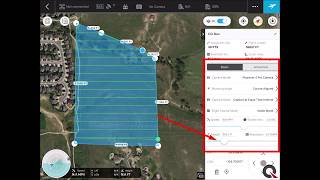
    Supplement your GPS machine control system with Quantum's Flight Pack drone kit. Subscribe to our YouTube Channel to learn how to put the latest technology to use in your business. In this video, follow an easy step-by-step tutorial of DJI's Ground Station Pro automated flight app. Ground Station Pro is pre-installed on every Quantum Flight Pack system.

  • Structurally Correct

    Have you thought about using your GPS machine control system for structural excavation? It might not be common place, yet, but we have more clients requesting structural excavation models every year. Depending on your needs and equipment, there are a couple ways we can set up the files for you. The first is simple. We put the 2D linework in your GPS file for stakeout or to double check your manual measurements. Here is a picture of what it might look like: You can use your rover to stakeout to the linework and check elevations vs. the project plans. It is similar to how you would use the linework to stakeout a utility like a watermain. It sure beats staking the whole project or pulling a tape measure from batter boards. While 2D is great there is still room for improvement. The most progressive contractors are moving to 3D modeling for their structural excavations, just like they use a 3D surface model to grade the rest of the project. Quantum's experts take the location and depth information from the Engineer's design to build a 3D model of the structural plans. That 3D model then guides your excavator to dig in the correct location and depth required by the plans, no more, no less. You can use your rover to stakeout locations and depth, too. The 3D model can show all of the elements of foundation excavation like stoops, continuous footings, pad footings, thickened slabs and even foundation drainage. Your excavator operator can dig with confidence knowing they are doing the work right the first time. There is no need for a grade checker to continuously check grade with a laser, or even slower, a tape measure. The 3D model can be set up to match the over-dig required by the concrete contractor or to match your machine's bucket width. If your excavation requires shoring or safe back slopes we can build the model to take that into account. On some projects, part of the foundation may require over excavation due to poor soil conditions. Just let our experts know what you need when you request the model. Often, the biggest pay off comes when it is time to place concrete. Small over excavations are easy to make without the continuous grade control provided by a GPS excavator and 3D model. Let's make the math easy. Assume we have a small 300' long by 3' wide x 3' deep trench footing. The entire trench will be filled with concrete. It should take 100cy of concrete. If it is over excavated by only 3" it will take an extra 8.3 yards of concrete to pour the trench footing - that is an entire extra mixer truck - over $1,000 in concrete. Keep in mind you will have an extra dump truck load of dirt to export or waste onsite, too. Seemingly small structural excavation errors can quickly add up to big bucks. A word from the wise…. DO NOT blindly use linework from the civil plans to stake out or excavate for any structure. You need to verify that the linework matches the structural plans. Often times, the building outlines or even bridge abutments in the civil CAD file are not kept up to date with the latest structural engineering changes. For this reason, Quantum's experts only build structural excavation models from the structural plans, the "S" sheets in most plan sets. It might seem complicated at first, but once you have your first 3D structural excavation job under your belt you will never go back. To take the leap Email or call us at 515-505-3510.

  • American Flat Track

    Machine control models aren't just for commercial projects. Quantum's experts improved a problem jump and fixed track drainage issues for the Peoria Motorcycle Club - making one of the oldest tracks in the American Flat Track circuit even better. American Flat Track news detailed how the latest construction tech made short work out of a big problem. Here is the link --> https://www.americanflattrack.com/news/view/cat-rescue-peoria-again

bottom of page