Search Results
80 results found with an empty search
- Introducing Tenstar Simulators: A Smarter Way to Train Operators Before They Hit the Jobsite
Anyone who’s tried to hire or train operators lately knows the truth: machines and grade control technology are evolving faster than the workforce. You can spend big money on a dozer or excavator with full 3D machine control, but if the operator isn’t confident with the machine AND grade control technology, production and quality never reach thier potential. Most contractors feel that pain every week. That’s exactly why we’re bringing a Tenstar Simulator into our booth at CONEXPO. Their platform gives operators a place to learn the machine, the technology, and operational decision-making—without burning fuel, without tying up iron, and without slowing your earthmoving project down. The first time we tried Tenstar, it didn’t feel like a demo or just practice. It felt like we finally closed the loop between classroom training and real production. Why Tenstar Changes the Training Curve Traditional training still depends on perfect weather, available machines, and a patient foreman. Tenstar removes all of those dependencies. Operators step into a seat that reacts and moves like real equipment, in scenarios based on real jobsites, with integrated machine control guidance from Topcon, Trimble, or Leica. What makes Tenstar's simulators stand out is how naturally they teach technology, not just machine operation. Operators learn to trust GPS, read what the model is communicating, make grading decisions, manage material and understand why the system behaves how it does in a wide range of grading situations. That combination of machine feel + tech understanding is what closes the gap contractors have been fighting for years. Here are the skills operators build inside the simulator: Running dozers, excavators, loaders, trucks, and more with realistic physics and motion. Reading digital plans and interpreting grade information Using GPS guidance for blade control and bucket position Making cut/fill decisions and verifying elevations It’s the closest thing to real seat time you can get without touching dirt. Why Contractors and Dealers Are Leaning Into Simulation Talk to any superintendent, and they’ll tell you the same thing: new operators aren’t the problem, the learning curve is. The cost shows up as rework, downtime, or tech that never gets used. Simulation flips that equation. Instead of learning during production, operators learn the fundamentals before they ever touch a real machine. Contractors see immediate gains: Faster onboarding Safer operators Fewer early mistakes More confident operators using GPS on day one A training plan that works year-round, even in winter Dealers see just as much value as contractors. With Tenstar, they can train customers on construction technology before delivery, demonstrate machine control without iron on-site, and even offer paid training programs that boost customer success and reduce avoidable warranty claims. Simulation turns training into something predictable and progressive. Not something squeezed into whatever time is left at the end of the shift. What You’ll Experience at Our CONEXPO Booth We’re hosting a Tenstar Simulator with GPS machine control in our ConExpo 2026 booth so visitors like you can get a true hands-on feel for the system. You’ll be able to step into a machine, see and feel the jobsite and working scenario. Even operate the machine control system just as you would in the cab of your machine. You'll immediately understand why this approach works and how to apply it in your operation. You can run grading passes, test GPS workflows and techniques, or simply feel how the simulator responds to different materials and blade loads. Most people walk away surprised at how quickly it becomes natural and how quickly the technology “clicks.” We’ll also walk through how contractors, dealers, and trade schools are using simulation technology to accelerate operator efficacy and technology adoption. Why We Chose Tenstar as Our CONEXPO Partner We believe the future of construction belongs to owners and operators who understand both the iron and the information. Machines aren’t going back to the 80's. 3D models aren’t going away either. The industry has to get creative to train our workforce. Simulators are a key piece of the training puzzle. Tenstar is one of the few platforms that makes that possible. They give crews a place to practice, fail, learn, and improve with zero consequences, before the real job depends on it. And they give dealers a way to show customers what construction technology can really do. Stop by our booth at in the North Hall at CONEXPO 2026, take a seat, and put the simulator AND grade control technology through its paces. You’ll see in seconds why we’re excited about this partnership and why simulation is becoming one of the most valuable tools in the industry. How to meet the Quantum Land Design Team at Conexpo 2026 With Conexpo 2026 just around the corner, it's time to get registered for the show and education sessions. You can use our ConExpo discount code for big savings at registration. Once there, visit Quantum Land Design at Booth N-11127 in the North Hall. Our team will be showcasing how autonomous GPS machine control, drone data and simulator technology can redefine how your jobs get done. You can always visit this blog post for the our latest updates or our CONEXPO exhibitor profile for more information about our booth.
- Topcon's CR-H1: Handheld 3D Capture
Topcon has released a new data collection tool, the CR-H1. The CR-H1 is a compact, one-handed 3D reality capture tool designed for construction, surveying, and earthwork professionals. It pairs an iPhone with built-in LiDAR and the Topcon HiPer CR GNSS receiver on a custom handle, creating detailed, georeferenced 3D point clouds as you walk. Thanks to a partnership with Pix4D, the CR-H1 processes data into colorized models ideal for construction verification, stockpile measurement, and pre-con jobsite walkthroughs. It's not a one-size-fits-all tool but it might close some gaps in your data collection processes. Why Quantum Clients Should be Interested The CR-H1 makes jobsite capture faster and easier. Quantum Land Design can turn your field scans into refined 3D models, volume calculations, and more. It’s perfect for: Quick earthwork checks Pre-construction scans Drone data supplementation See It at CONEXPO 2026 Catch the CR-H1 at Topcon’s booth in the West Hall at CONEXPO 2026. And when you're ready to turn that scan into a useful model, Quantum can help with the data. With ConExpo 2026 just around the corner, it's time to get registered for the show and education sessions. You can use our ConExpo discount code for big savings at registration. Once there, visit Quantum Land Design at Booth N-11127 in the North Hall. Our team will be showcasing how autonomous GPS machine control, earthwork takeoffs, and drone data can redefine how your jobs get done. You can always visit this blog post for the our latest updates or our CONEXPO exhibitor profile for more information about our booth. Here's a link to Topcon's press release for the CR-H1.
- Single Point GPS Site Control: How to Ensure Accuracy & Avoid Errors
Many contractors regularly use single point site control as a quick and convenient way to leverage their GPS machine control systems for projects that do not require formal engineering. Typically small building sites, agricultural designs, stockpile calculations, or as an ad hoc laser solution. However, single point site control has limitations that can lead to accuracy and repeatability issues if not implemented properly. If you're not entirely clear about how site control affects your grading accuracy, read our detailed blog post on The Four Principles of Site Control to ensure you're making informed decisions on your projects. Common Pitfalls of GPS Single Point Control Here's an avoidable scenario that Quantum Land Design has encountered when a contractor is new to single point control: Initial Topographic Survey: The contractor sets up GPS with single point control and performs an initial site topo. Watch our YouTube video to learn how to perform a topographic survey . Model Creation: They send the data to Quantum, where we produce a precise 3D grading model for their design. It might be a building site, drainage improvement or fishing pod. So far, so good Return for Grading: Returning days, weeks, or months later, the contractor re-initializes their GPS system using the original single control point, only to find that the site model no longer matches the existing conditions—it’s rotated or tilted in an odd orientation. The problem isn't the design or initial survey; it's that a single control point isn't stable enough to reliably align your 3D model repeatedly. Unlike engineered sites with multiple control points, a single point allows your site to shift or rotate around that point, compromising accuracy significantly. Re-read our site control principle 3 blog post for a refresher on why you need multiple control points. Reliable Single Point Control: Step-by-Step Guide If your project isn't engineered, but you'd still like to use GPS for accurate grading, follow this reliable eight-step method to establish robust single point control: Establish a Permanent Base Station: Set up your base station in a permanent and stable location. If you use a fixed height tripod, mark the location so you can find it to set up in the future. Set up single point control as you normally would. Many contractors use 10,000, 5,000, 100 for N,E,Z coordinates - avoid negative numbers. Verify your GPS system initializes and works as expected. Identify Reusable Control Points: Find at least four, but preferably five, locations on the outside boundary of the site you can take topo shots and return in the future to find them ( see this blog post to help determine where to place control). These areas might be a sidewalk corner, storm sewer drain, property pin, etc... You may need to drive a pin or hub in the ground if there are not any permanent features on the site boundary. It is best to mark these places with a lathe or at least paint them; you will return to them in step 6 and in the future. They must be in a location you can return to as the project progresses and are not disturbed. You will use these locations to set up new control points. Record Coordinates Carefully: Use your GPS rover to take a topo shot at those locations and save them in your controller. Write down, take a picture of or export to a text file the point #, northing, easting and elevation of those points. FYI - it is best record the shot over a 30 second or longer observation period. We would also suggest you use three decimal places for each point, to reduce rounding errors. *** Tip: Check with your GPS vendor—some systems allow you to directly record these shots as control points, simplifying the process significantly.*** Start a New Project File: Create a completely new project file in your GPS controller. Do not reuse the single point file from the initial survey. Enter Your Control Points: Enter or import the northing, easting and elevation from the topo shots you took in step 3 as control points in your new project. Measure Control Points: Measure in the control on the points you topoed in step 3, just as if it were an engineered project. You will see higher residual errors than on control points placed by an engineering firm. If something is way off make sure you have good GPS and radio signal at the new control locations. The slightly higher residuals are acceptable in this case as the project is now "controlled" and won't tip or rotate over time. It just won't be quite as precise as a project where a surveyor placed control with survey processes and instruments. Perform Check Shots on Hard Surfaces: Take a few topo shots on hard surfaces and save them to your controller. When you set up in the future, in addition to checking into your control points, you can use them to verify that your system is set up right and matches your earlier work. Verify Every Visit: EVERY time you return to the site, set up your base and start the project with the control file you made in steps 4, 5 and 6. Stake out to your control points and the topo checks from step 7 to verify everything is working correctly. This graphic should help you understand how how to layout your control points. Why Avoid Single Point Control for Engineered Sites? The above method should never be used on engineered sites. We always suggest that you hire the Project Engineer's surveyor to set up site control for engineered projects. Here's why: Your machine control model must align to the Project Engineer's data. Detailed explanation in this blog post. Engineered projects require that your work align to the previous and following contractor's work. Misalignment to the Project Engineer's coordinate system will lead to costly rework and delays. The Project Engineer's surveyor has authoritative knowledge and can ensure accuracy. Real-World Example: The Cost of Mistakes One contractor client of ours learned the "Single Point" lesson the hard way on a pond project in North Dakota: This contractor set up single point control without any additional checks. He returned a couple months later with a pond design file, started his job up on the old single point control and started grading. When he was close to done with the dam, it became obvious that something was not right. The entire design was tilted nearly 3 feet from one side of the project to the other. The design file was not the issue, single point control was. It took a redesign and significant re-work to fix the problem. Had he taken the time to set up his control properly, he would never have had to suffer through the expense and wasted time caused by the tilted site. Ready to topo your projects and have Quantum help with the design? Email us or call 515-505-3510 ex:702. Our team is here to help ensure your grading projects run smoothly and accurately every time.
- The Quantum Family Continues to Grow
We are excited to announce that Taylor Eisenmann has joined the Quantum Land Design team! With a background in Construction Management and Drafting, Taylor brings valuable expertise and fresh energy to our growing family. Taylor will play a key role in machine control design and UAV flights, supporting our mission to provide cutting-edge solutions in construction technology. As Taylor prepares to earn his UAV pilot’s license, we look forward to seeing his contributions in action. Join us in wishing Taylor the best of luck on this exciting journey. Welcome aboard, Taylor!
- Integrating Machine Control with UAV Aerial Data Acquisition
Technology is revolutionizing the heavy civil construction industry, and Quantum Land Design is at the forefront of this transformation. From aerial data imagery captured by advanced UAVs (unmanned aerial vehicles) to precise 3D machine control systems for GPS-positioned earthmoving equipment, the possibilities are endless. At Quantum Land Design, along with our sister company AeroView Services, we offer a comprehensive suite of services designed to equip your company with cutting-edge tools. Whether you need UAV aerial data acquisition, 3D GPS machine models, or construction technology consulting, we’re here to be your competitive advantage. Discover how these integrated solutions can optimize your project timelines, enhance precision, and reduce costs. The future of heavy civil construction is here—let us help you lead the way.
- Quantum Land Design Welcomes Orrin Lanz as Director of Engineering
Quantum Land Design is proud to announce the addition of Orrin Lanz as our new Director of Engineering. Orrin brings a wealth of expertise to our team, solidifying our commitment to delivering cutting-edge services in construction technology. Orrin graduated with a Bachelor’s degree in Mechanical Engineering from Iowa State University and has honed his skills across various high tech industries. His proficiency in leading CAD software tools—including AutoCAD, Carlson, IntelliCAD, Creo, and SolidWorks—positions him to drive excellence in GPS machine control models for grading, 3D construction models, and earthwork analysis. In his new role, Orrin will oversee Quantum’s engineering team, manage our expanding customer base, and ensure our solutions continue to exceed client expectations. His innovative approach aligns with our mission to provide precision and efficiency for construction professionals. We’re thrilled to have Orrin on board and look forward to his contributions in advancing Quantum Land Design as an industry leader. Welcome to the team, Orrin!
- Drone Surveying in Construction: Simple, Effective, and Cost-Efficient
The construction industry is buzzing about drones, and for good reason. They’re powerful tools for collecting topographic data at a low cost, but all the hype can make drone surveying seem overwhelming, complicated, and expensive. At Quantum Land Design, we focus on keeping things simple to make drone data collection easy, accessible and reliable. Let’s discuss what you need to know to take advantage of drone surveying technology. The Basics: What You Need To collect high-quality drone data, you only need two things: a GPS base/rover and a drone . That’s it. Forget about expensive software, costly web-based processing services, or even a high-end PC for photogrammetry processing. Keep it simple and cost-effective. GPS and Ground Control Your GPS machine control base/rover system is used to measure your ground control and check shots. Ground control is just points on the ground that can be seen in your drone photos. By using the same base/rover setup you’ve already calibrated for machine control, we ensure your drone data aligns seamlessly with your machine control model and any work the project Engineer has done or will do in the future. While RTK/PPK drone systems have been heavily marketed, a simpler setup works just as well and is often best for most contractors. The goal here is to collect reliable drone data that helps you make better management decisions—not to become an expert in complex systems. The only time you can skip the ground control points is when your drone data doesn’t need to align with your machine control model or be repeatable. Quick stockpile volume calculations or a simple orthophoto for a developer can fall into this category. Ground Control Points: Placement is Key Ground control points (GCPs) should surround the site (similar to a GPS site control layout) and be placed at roughly the highest and lowest elevations. We recommend using a minimum of five GCPs, marked with temporary targets or paint, with their coordinates recorded by your GPS rover. Check out the image below to see how the red ground control surrounds a small, uniquely-shaped project. Importance of Topo Check Shots Topo check shots are nearly as important as the control points. These are simply topographic shots collected with your rover roughly between GCPs and in key areas. When processing your photos, the drone data is aligned with the ground control, while the check shots provide an independent verification to ensure the final surface is accurate and correctly positioned. Take a look at the layout below—note how the red GCPs surround the site while the yellow check shots are positioned between the control points. Choosing the Right Drone Many contractors use DJI drones, such as the DJI Mavic 3 Enterprise. There are plenty of options on the market, but DJI models are affordable and meet the accuracy requirements for most civil projects. The drone's job is simple: fly over the site and capture overlapping photos at fixed intervals. You can use the free app included with your drone to program the flight—just draw a box around the flight area, set your parameters, and let the drone do the work. You don’t even need to fly it manually. Check out our YouTube video at the bottom of this post for a detailed walkthrough (and don’t forget to hit subscribe!). What Comes Next? That’s it—with the GPS base/rover you already own and an inexpensive drone, you can gather topo data on any project, anytime. So, what do you do with the photos and control data? That’s where Quantum Land Design steps in. Upload your photos and control data to our cloud. We'll process the data to generate a bare earth 3D surface and orthographic photo of your site that lines up seamlessly with your machine control model and any past or future surveys. Our technical team can provide volume calculations, create custom designs, or deliver the 3D surface for you to use in your preferred software—whether it’s AgTek, Trimble Business Center, Topcon Magnet, InSite or Carlson Takeoff. No need to learn any new tools or applications; our deliverables will be compatible with the software you already use and know. Got Questions? Feel free to email or call me at 515-505-3510 ext. 702. We'll get you up and running in no time.
- Thanks for Visiting Us at ConExpo 2023!
We’re thrilled to have met so many of you at ConExpo 2023! Whether you stopped by our booth or joined one of our education sessions, we genuinely appreciate your time and interest in advancing construction technology. Our team will be reaching out to each of you individually, but we wanted to share a brief overview of our services to answer some of your questions and help you see how we can work together to maximize your investment in construction technology. Machine Control Models We specialize in creating GPS machine control models for all project types and brands, including Trimble, Topcon, and Leica. Our streamlined process ensures fast turnaround—most models are delivered within three business days . Here’s how it works: To get request a model: Send us the complete construction plans (PDF) along with the matching CAD file . For a quote: Simply email the PDF file to us at this address . Pricing: All projects are quoted as lump sums. Revision costs vary based on the extent of changes, up to the full model cost for major updates. Final delivery: Models are provided in a format ready to load directly into your Trimble, Topcon, Leica or other system. 💡 Bonus: Explore our free educational content to learn how to optimize your machine control system and maximize productivity on the job site. Drone Services and Data Processing We offer comprehensive drone data processing for any project, regardless of your drone’s make or model. Here’s what you can expect: Simple process: Upload your photos and ground control data, and we’ll process them into a bare earth surface and orthophoto for use in takeoff software. Affordable pricing: No recurring fees or subscriptions—just per-project charges. No takeoff software? Our team can handle volume calculations for you. Ready to start? Upload your drone data here . Quantum Flight Pack If you’re looking for a complete drone solution, consider the Quantum Flight Pack , featuring DJI’s cutting-edge Mavic 3E drone . This all-in-one kit includes: Extra batteries for extended operations Hard case for rugged durability Ground control targets and essential accessories With the Quantum Flight Pack, you’ll have everything needed to collect accurate topographic data by drone. 💡 Learn more: Visit our free education page for step-by-step guidance on collecting ground control and drone topo data. Questions? Email Zach at zach@avqld.com for more details. We’ll be following up with each of you soon to provide more personalized responses, but don’t hesitate to reach out in the meantime—whether it’s by email, text, or phone . It was a pleasure meeting you, and we look forward to helping you achieve your goals in construction technology. Best Regards, Ryan Murguia - Machine Control - ryan@avqld.com Zach Pieper - Drone Data/Biz Development - zach@avqld.com Orrin Lanz - Machine Control - orrin@avqld.com Taylor Eisenmann- Paving and Roads - taylor@avqld.com Noah Murphy- Commercial Sites - noah@avqld.com Hunter Hill - Commercial Sites/Drone Data - hunter@avqld.com Kiley Murguia - Controller - kiley@avqld.com
- Trimble SCS900 Topo Point Export Made Easy
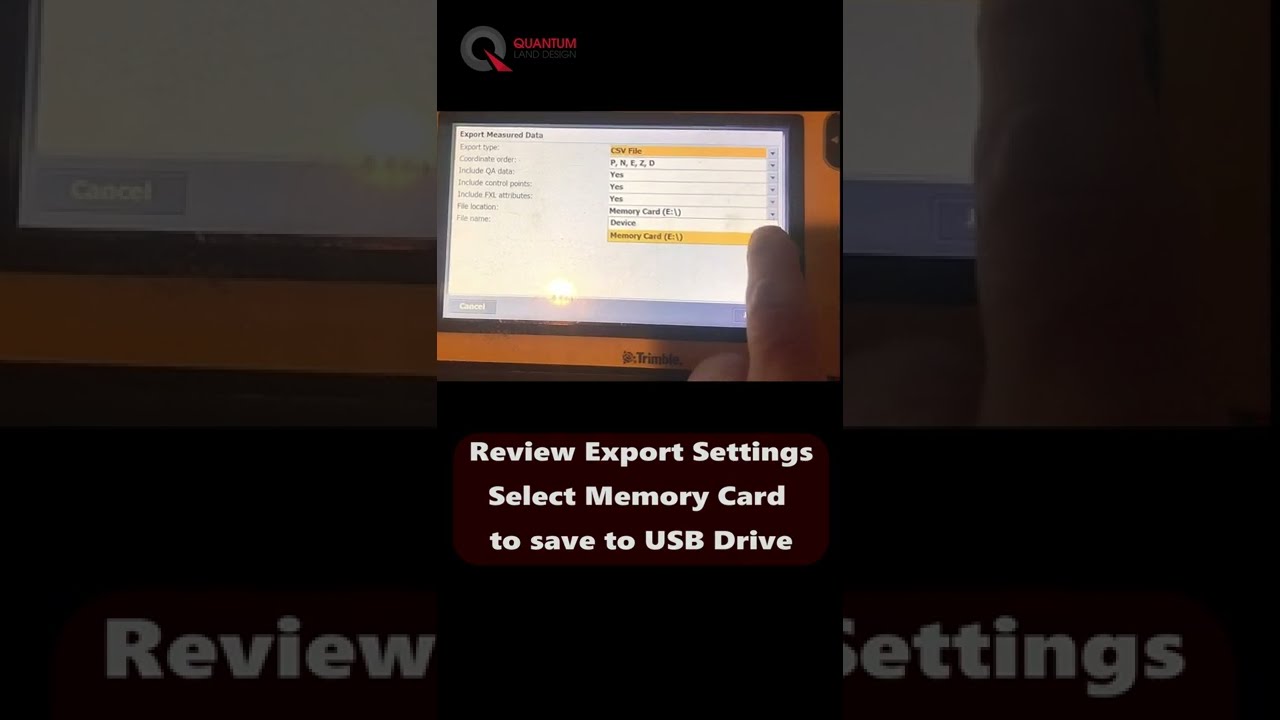
Exporting topo points from the Trimble SCS900 machine control system is a breeze! Watch the short video below for a quick guide. Why Export Topo Points? There are many reasons to export topo points, including: Sharing Ground Control Points (GCPs) from a Quantum Flight Pack flight Exporting site topos collected with your rover Providing as-built data to clients for project documentation Getting Started with Ground Control for Drone Flights Start here to learn about setting up ground contro l for drone flights and placing it accurately in the field. Effective ground control helps ensure that your data aligns precisely with project requirements. Stay Updated on Construction Technology Tips Make your work easier by subscribing to our YouTube channel . We regularly post short videos to help you get the most out of your Trimble SCS900 and other construction technology tools.
- John Deere and Trimble Partner to Bring Advanced Machine Control Solutions to Earthmoving Contractors
John Deere and Trimble have teamed up to deliver better machine control solutions for contractors in construction. By combining John Deere's heavy equipment expertise with Trimble's GPS machine control technology, this partnership aims to provide practical tools to improve accuracy and efficiency on projects. What This Means for Contractors For those using John Deere construction equipment with Trimble machine control systems, this partnership means better integration and more efficient technology. Trimble’s Earthworks GPS and machine control features are being integrated directly into John Deere SmartGrade machines, making it easier to use the technology across various earthmoving projects. This collaboration brings machine control technology to more equipment, helping contractors manage earthworks, grading, and excavation with greater precision. It’s especially beneficial for those already using Trimble tools who want seamless compatibility with their John Deere fleet. Key Benefits for Contractors 1. Better Integration: Machine control systems will be integrated directly into John Deere construction equipment, making it easier to use and backed up by dealer support. 2. Increased Productivity: Combining John Deere SmartGrade equipment with Trimble’s Earthworks machine control helps contractors work more efficiently and complete projects faster. 3. More Access and Options: Contractors will have access to advanced machine control and GPS tools, benefiting companies of all sizes and technology preferences. The Future of Earthmoving Technology This partnership marks a significant step for contractors who rely on machine control and precision tools to maximize the productivity of their earthmoving equipment. Adding these tools to your operations can help you stay ahead in the construction industry. If you’re using John Deere machines and Trimble’s control systems, this collaboration will make your job easier with a more integrated worksite and technology. At Quantum Land Design, our machine control models are the backbone of your GPS technology, no matter the brand. Read more here: - Trimble Press Release - John Deere Press Release
- How to Use Drones in Your Earthmoving Business
Are you ready to take your earthmoving business to the next level? Join me at the upcoming Trimble Dimensions conference for a session that will open up new possibilities for using drones in construction. My session, "How to Use Drones in Your Earthmoving Business," will cover everything you need to get started with drone technology and, what you actually want to know , how to turn that technology into real profits. Don't worry, the machine control system you have invested in will be leveraged to get the most out of your drone data. Drones have quickly become a game-changer in the construction industry, especially for earthmoving contractors. With precise aerial data, contractors can improve project planning, streamline processes, and verify work completed—all while saving time and reducing costs. But where do you start, and how do you make it all work for your specific needs? That's exactly what we'll dive into at my session. We'll keep things practical and straightforward—no deep technical gibberish. I'll cover what you need to get started with drones, how to incorporate them into your existing workflow, and where you'll see the biggest benefits. We'll spend most of our hour on real-world applications, looking at how other contractors are using drones to document work, verify quantities, and improve their bids. The beauty of drone data lies in its flexibility and the ability to leverage it throughout the entire project lifecycle. Whether you're documenting progress, verifying cut and fill volumes, or refining future bids, drones can make your job easier and more profitable. My goal is to show you how to make this technology work for you, without the need to overcomplicate it. I won't be pushing a specific drone system or data processing methodology. Instead, we'll discuss the options available, so you can decide what fits best for your company and the work YOU do. This session is all about empowering you with the right knowledge to make informed decisions. If you're attending Trimble Dimensions, make sure to stop by my session at C-1746. Bring your questions—I'll answer every one I can or we can leverage the audience to share their experience. Let's explore how drone technology can help you work smarter, be more efficient, and ultimately improve your bottom line. Looking forward to seeing you there! Wednesday, November 13th 9:00 AM, Galileo 1006 Register at the link below (have your login info handy). How to Use Drones in Your Earthmoving Business
- World of Concrete 2024
Quantum's team is looking forward to attending World of Concrete. We always enjoy the opportunity to re-connect with old friends and meet new ones. Reach out to one of us here if you'd like to meet up in Las Vegas. As our team prepares to walk the show floor we do our our best to step into a concrete contractor's boots. Of course, our focus is on how to identify and adopt technology that will improve our business. Here are some questions you might consider asking vendors about their 2D/3D paving, grading or other machine control technologies at the World of Concrete: Technology Overview : Can you provide an overview of your 3D paving and grading technologies? What makes your technology stand out from others? Efficiency : How does your technology improve the efficiency of paving and grading projects? Can you share any metrics or case studies? How can I avoid or limit a reduction in efficiency a when I first adopt the technology? Quality Control : How does your technology ensure the quality of the paving and grading work? Does it have any built-in quality control or error detection features? Integration : Can your technology be integrated with other systems or technologies? How easy is it to incorporate into existing workflows? Will your new system be compatible with the technology I currently use? Training and Support : What kind of training or support do you provide for customers who are new to this technology? Who is the dealer for my area? How can I contact them? Costs : What are the costs associated with implementing and maintaining your technology? Are there any ongoing costs such as subscriptions or service fees? What is the cost of and who can install software updates? Future Developments : What future developments are planned for your technology? How do you see it evolving in the next few years? Remember, the goal is to gain an understanding of how technology can specifically benefit your needs or projects. While it's tempting to be drawn to the latest innovations at the show, sometimes the best solution is to step back, re-evaluate your business operations then decide if adding technology really is the best solution. Enjoy your time at the World of Concrete!